

Wix vs Squarespace: Which Is Easiest to Use in 2026?
 By Bailey Abson, SEO Assistant · 4 March 2026 · 8 min read


Wix vs Squarespace, in short: Squarespace is the tidier, more guided option for a simple, good-looking brochure site, while Wix is the more flexible all-rounder that does more (features, SEO, ecommerce and growth) without forcing you onto third-party tools. For most small and growing UK businesses, Wix ends up easier to live with over the long run.
It is one of the most common questions we get from businesses about to build a website. The right pick depends on what your site actually needs to do, so this is our honest comparison covering ease of use, design, features, ecommerce, SEO and pricing. Yes, we are a Wix-only agency, so we will be upfront about where Squarespace genuinely wins.
Disclosure: This post contains affiliate links. If you sign up through them we may earn a small commission, at no extra cost to you.
If you have decided Wix is the right fit, you can start building on Wix for free here and try the editor before you commit.

Wix vs Squarespace: quick comparison
Wix | Squarespace | |
Best for | Flexible sites that grow and sell | Simple, polished brochure sites |
Ease of use | Easy, with more choices | Very easy, more restricted |
Design flexibility | High, full control | Guided, template-led |
Built-in features | Forms, bookings, CRM, store and more | Solid basics, fewer extras |
Ecommerce | Strong and scalable | Good for smaller catalogues |
SEO control | Clear fields and guidance | Capable, less obvious |
Free plan | Yes (with Wix branding) | No, trial only |
What does "easy to use" actually mean?
Before comparing, it helps to define easy. For most business owners it means:
- Can I build a site without hiring someone?
- Can I edit text and images quickly?
- Can I add new pages without messing up the design?
- Can I do basic SEO without going down a rabbit hole?
- Can I add features (forms, bookings, shop, blog) without extra faff?
- Can I keep the site looking consistent as it grows?
That is the real test, so that is how we have compared them.
First impressions: guided vs flexible
Squarespace: clean, guided and hard to ruin
Squarespace feels like a beautifully laid out showroom. Everything is tidy. You pick a layout, drop your content in and it looks nice quickly. It is harder to make a mess because Squarespace does not give you much design freedom. That is great if you want a simple brochure-style site, do not want to make lots of layout decisions and prefer a guided editor.
Wix: more freedom, more choices
Wix is more like a full toolbox. You can build something genuinely custom without touching code, which is brilliant when you want your site to look a certain way rather than like every other template. With flexibility come decisions, and if you are not careful you can overdo it.
That said, the newer Wix experience, especially Wix Studio built properly, is far more structured than the old "drag stuff anywhere" reputation Wix used to have.

Ease of building your first site
Wix wins for speed if you know what you want
Choose a template, edit visually, add features like contact forms, bookings, a blog or a shop, and preview responsive layouts. Wix also offers setup guidance if you want some hand-holding at the start.
Squarespace wins for simplicity with a standard layout
Squarespace's section-based building is very tidy and everything sits on a consistent grid. If your site is Home, About, Services and Contact, Squarespace is dead simple. The moment you want something different, such as a custom layout or an unusual page structure, it can become oddly frustrating.
Editing text and images day to day
This is where most business owners live: not the build phase, but the "quickly update the site before I forget" phase.
- Wix: click any element and edit it, drag in new images, update buttons and links, duplicate sections and pages, and manage content collections for dynamic pages. If your site changes often, Wix is very comfortable.
- Squarespace: also straightforward, but everything runs through the block editor, so it can feel a little slower. Not difficult, just less immediate.
Adding pages and keeping the design consistent
Squarespace is more foolproof
Because it is more restricted, Squarespace makes it easier to stay consistent as you add pages. Everything follows the same spacing and layout rules.
Wix is easier to customise, but consistency depends on the build
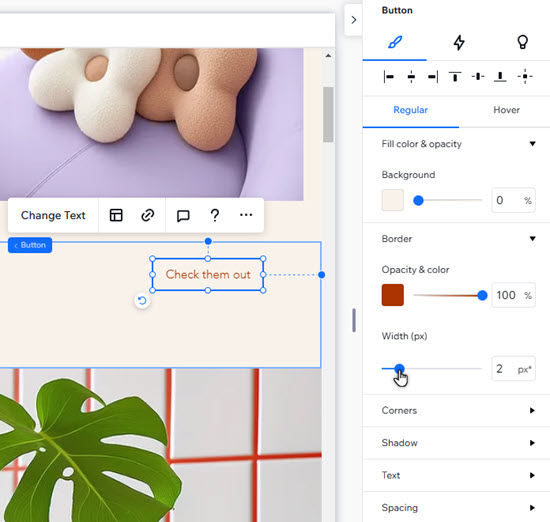
In Wix you can keep things consistent by using global styles, repeaters and sections, sticking to a grid and keeping spacing rules consistent. A professionally built Wix site, especially in Wix Studio, stays very consistent. If you are DIYing and winging it, Wix gives you enough rope to tie yourself in knots.
Adding features: forms, bookings, shop and blog
This is where Wix pulls ahead for a lot of small businesses.
Feature | Wix | Squarespace |
Forms and CRM | Built in and connected | Basic forms |
Email marketing and automations | Built in | Available, automations less strong |
Bookings | Wix Bookings built in | Can feel clunky without the right setup |
Blog | Built in | Built in |
Online store | Built in and scalable | Good for smaller catalogues |
Custom database content | Flexible CMS collections | Less flexible |
If your site is purely informational, Squarespace is fine. If your website is part of how you run the business (leads, enquiries, bookings and follow-ups), Wix usually feels easier because you are not stitching tools together. Selling online? Read why Wix eCommerce works for selling and marketing.
SEO: which is easier?
Neither platform is hard for SEO, but Wix tends to be clearer for non-technical owners. Wix shows SEO fields (page title, meta description, URL) clearly, includes built-in SEO checks and guidance, makes redirects easy and gives you editable, structured page elements. Squarespace lets you edit SEO fields too, but it can be less obvious where things live once you go beyond the basics.
Mobile editing and responsiveness
- Squarespace: responsive out of the box with little tweaking needed, but you cannot always control how things stack or space out.
- Wix: more control over mobile layouts, especially in Wix Studio. That matters for conversions, because mobile layout is often the difference between someone enquiring and someone leaving. More control does mean more decisions.
Wix Studio vs Squarespace
Wix Studio is Wix's more advanced platform, built for agencies, designers and businesses that want a custom site. Compared with Squarespace, it gives you breakpoints, flexible grid and flex layouts, finer mobile control, CMS-driven dynamic pages and room for custom code. Squarespace is simpler to pick up but has a lower ceiling. If you want a bespoke, scalable site that still feels manageable once it is built, Wix Studio is the stronger choice. Our Wix Studio vs Wix Editor guide explains the difference between Wix's two editors.
Wix vs Squarespace pricing
Pricing is close enough that it rarely decides things on its own, but there are real differences:
- Wix has a free plan (with Wix branding and ads) and paid plans that start low and scale up. Its business and ecommerce plans bundle in features you would otherwise pay extra for elsewhere.
- Squarespace has no free plan, only a trial, and keeps pricing simple with fewer tiers. Adding advanced functionality can mean paying for third-party tools.
Compare the total cost of a setup that does everything you need, not just the headline monthly price. Check both platforms' current pricing pages, as plans change. For a business that wants bookings, a shop or marketing tools, Wix usually works out better value because it is all in one place.
So which is easier to use?
Squarespace is easier if you | Wix is easier if you |
Want a basic site | Want more control over design |
Like working within pre-set layouts | Plan to add forms, bookings, a shop, a blog or automations |
Do not want much customisation | Want to update the site often |
Want something hard to break | Want your website to be a proper marketing tool |
For most small to medium businesses, we find Wix ends up easier long term because it adapts as the business grows, without forcing you into third-party tools or a rebuild.
The real secret: build quality matters more than the platform
A well-built Wix site is incredibly easy to manage. A badly built one can feel messy. Squarespace is the same: easy until you try to do something it does not like, then you hit a wall. If you are DIYing, Squarespace might feel simpler at first. If you want a site that grows with you, Wix usually wins over time.
Where does WordPress fit in?
People often weigh up Wix vs Squarespace vs WordPress together. WordPress is the most customisable of the three, but also the most technical: you handle hosting, plugins, security and updates yourself, or pay someone to. Wix and Squarespace are both fully hosted and far simpler to run day to day. If you want a professional site you can actually manage yourself, Wix and Squarespace both win on ease, with Wix offering the most room to grow. We also compare all three in Wix vs Squarespace vs WordPress for inclusivity.
Need a hand choosing, or fixing what you have got?
If you are stuck between Wix and Squarespace, we are happy to give you an honest steer. If you already have a Wix site that feels awkward to edit, it is usually not because Wix is hard; it is because the site was not structured properly. We can help with:
- A new Wix website, with packages from £849 + VAT
- Moving from Squarespace to Wix, without losing your content or rankings
- Wix SEO, so your site actually ranks and brings in traffic
- Wix Fix, hourly help for layouts, mobile issues, speed and SEO setup
Send us your current site and tell us what you are trying to achieve. We will tell you what is worth doing and what is not.
Frequently asked questions
Is Wix or Squarespace better for a small business?
For most small businesses, Wix is the better all-rounder. It matches Squarespace on ease of use but gives you more built-in features, stronger ecommerce and more room to grow. Squarespace is the better pick if you want a simple, elegant brochure site and value a guided, hard-to-break editor over flexibility.
Is Wix or Squarespace easier to use?
Squarespace is easier for a simple, standard site because its guided editor makes it hard to break the layout. Wix is easier once you want more: frequent updates, custom layouts, bookings, a shop or marketing automations. For most growing businesses, Wix ends up easier long term because you are not stitching extra tools together.
How much is Squarespace vs Wix?
They are broadly similar. Wix offers a free plan plus paid plans that scale up, while Squarespace has no free plan, only a trial. The bigger difference is value: Wix bundles more features into its plans, so you are less likely to pay extra for third-party tools. Check both pricing pages, as plans change.
Is Wix Studio better than Squarespace?
For custom, scalable sites, yes. Wix Studio offers breakpoints, flexible layouts, finer mobile control, CMS-driven dynamic pages and custom code. Squarespace is quicker to learn but has a lower ceiling. If you want a simple brochure site and no design decisions, Squarespace is fine. If you want a bespoke site that grows, choose Wix Studio.
Does Squarespace own Wix?
No. Wix and Squarespace are two separate, competing companies. Neither owns the other, and they are direct rivals in the website builder market. Wix offers a free plan and a wide range of built-in business tools, while Squarespace focuses on design-led templates with paid plans only.
How do I switch from Squarespace to Wix?
You move your text and images across, rebuild the pages on Wix, set up redirects from your old URLs and point your domain to the new site. The mechanics are straightforward; protecting your rankings with proper redirects is the part that needs care. We handle Squarespace to Wix migrations regularly.


