

Wix for Photographers: The Best Way to Show Your Work and Get Seen
 By Bailey Abson, SEO Assistant · 8 April 2026 · 7 min read


Wix is one of the best platforms for photographers because it's built visual-first. It gives you beautiful galleries, proper control over mobile layouts, easy self-editing and all the SEO tools you need to rank, without a developer on speed dial. The difference between a Wix site and a Wix site that brings you work is how it's set up.
If you're a photographer, your website has one job: make your work look unreal, with as little friction as possible. Not "tell your story". Not "build your brand ecosystem". Just:
- Show your photos properly
- Load fast
- Look great on mobile
- Make it easy to enquire and book
- Ideally, bring you leads from Google
We build Wix sites for UK businesses all the time, creatives included. This is why we recommend Wix to photographers so often, and how we make those sites easier to rank.
Why photographers need a different kind of website
A café website can get away with a few nice photos and a menu. A photographer's website is the product. So your platform needs to handle:
- Beautiful galleries without wrecking image quality
- Fast loading, even with lots of photos
- Proper mobile layouts, because that's where most people will see your work
- Simple navigation so clients find the right portfolio
- Clear calls to action for enquiries, bookings, pricing and availability
- SEO basics, so you can rank for searches like "wedding photographer in Bristol"
Wix is one of the few platforms that covers all of that without needing a developer.
Why Wix works so well for photographers
Wix was built for people who care what a site looks like. That's exactly why it suits photographers.
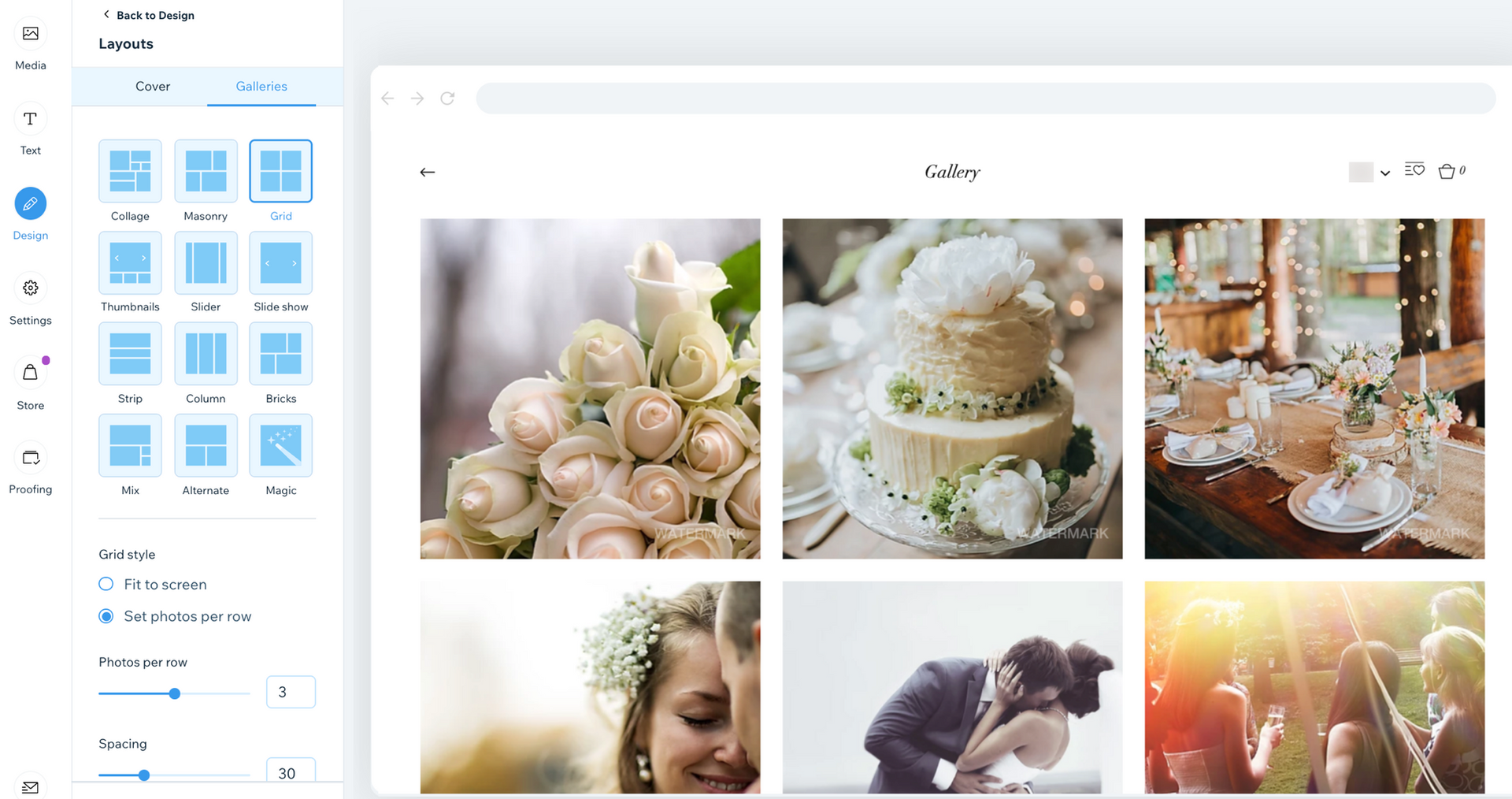
1. Galleries that do your work justice
Wix has gallery options to suit different photography styles:
Gallery type | Works well for |
Grid | Commercial work |
Masonry | Lifestyle shoots |
Full-width slideshow | Wedding storytelling |
Lightbox | Viewing detail up close |
Password-protected galleries | Delivering work to clients |
You're not stuck with one template style forever. Layouts can be tailored to how you want people to experience your work. Our guide to building a portfolio on Wix goes into more detail.
2. Mobile layouts that don't ruin your composition
Most couples browse wedding portfolios on their phone while half-watching Netflix. Wix gives you proper control over mobile design, so images don't get awkwardly cropped, buttons aren't tiny, text stays readable and galleries still feel premium rather than squished. This is where a lot of photographer sites on other platforms fall apart.
3. You can update it yourself without breaking anything
Once it's set up properly, you can add a new shoot, swap featured images, update pricing, post a blog or tweak your contact form, all without messaging your web designer every time.
Wix SEO for photographers: yes, it can rank
Let's be blunt: Wix isn't bad for SEO. That reputation comes from years ago, and it still gets repeated by people who haven't touched Wix in a decade. We bust a few more of these in Wix SEO myths explained.

Wix gives you the tools you need. The problem is that most photographers:
- Don't set the site up strategically
- Use generic page titles like "Portfolio" and "Gallery"
- Upload 12MB images and wonder why the site feels slow
What Google needs from a photographer's website
- Pages targeting real search terms, not just "Portfolio"
- Clear location signals if you serve a specific area
- Fast loading and good mobile performance
- A proper heading structure (H1, H2 and so on)
- Indexable text, not just images
- Internal links that guide visitors through your site
- Solid technical foundations: metadata, redirects, a sitemap
Wix can do all of that. We do it every day.
The site structure that helps a photography website rank
If you want enquiries from Google, you need more than a homepage and a grid of photos. Here's the structure we usually recommend.
Core pages
- Home: your best work, who you serve, your location and a clear call to action.
- Portfolio: ideally split into categories, such as Weddings, Brand and Family.
- About: your style, your approach and a photo of you (yes, it matters).
- Pricing and packages: even if it's just "starting from".
- Contact: a simple form, clear next steps and how quickly you'll reply.
SEO pages that bring in traffic
- Location pages, where genuine: for example "Wedding Photographer in Manchester" or "Brand Photographer in Leeds".
- Service pages: for example "Wedding Photography", "Commercial Product Photography" or "Personal Branding Photography".
Your blog: the secret weapon
This is where photographers can really clean up on SEO. Posts that work well include:
- Venue guides for weddings
- "What to wear" guides for shoots
- Recent client stories (with permission)
- Tips for business owners about branding photography
- Answers to questions people actually Google
A blog isn't fluff when it's built around what people are searching for.
Wix features photographers should use (and common problems to avoid)
Features that help
- Wix Photo Albums and Galleries, set up properly
- Wix Forms, with smart fields and automations
- Wix Blog, for SEO and showcasing shoots
- Wix Bookings, great for mini sessions, headshots and studio slots
- Wix CRM, handy for managing enquiries
Things we often fix
- Over-designed templates that look clever but confuse visitors
- Slow pages because images weren't compressed
- Too many animations
- Hidden text or awkward spacing on mobile
- "Click here" buttons with no context
- Contact forms that ask for too much and scare people off
A photography site should feel effortless to browse.
Wix vs WordPress vs Squarespace vs Webflow for photographers
Platform | The honest take for photographers |
Wix | Visual, flexible, easy to manage yourself and fully capable of ranking |
WordPress | Powerful, but often plugin soup, constant updates, random speed issues and security headaches. You'll usually need a developer for anything beyond the basics |
Squarespace | Looks nice out of the box, but layouts are less flexible, SEO controls can feel basic and customisation gets fiddly |
Webflow | Great if you're basically a designer and developer. Most photographers don't want to spend weekends learning it |
If you want control over how your portfolio looks and performs, without the maintenance, Wix usually wins.
How we make Wix photography websites even better
A good Wix template can look decent. A properly built Wix site looks premium, loads quickly, guides visitors towards enquiries and ranks on Google without you fighting it. Here's what we do.
1. Design around your photos
Lots of photographer sites feel like template first, photos second. We design layouts that suit your style, whether that's light and editorial, bold and contrasty, documentary storytelling or clean commercial. Your work is always the hero.
2. Sort the SEO foundations
- Page titles and meta descriptions that target real keywords
- Heading structure (H1, H2, H3)
- Image optimisation without losing quality
- Internal linking
- Clean URLs
- Redirects and indexation checks
- Google Search Console setup
- Basic schema where appropriate
3. Improve speed without making the site look worse
We look at image sizing and compression, lazy loading and gallery behaviour, fonts, unnecessary apps and scripts, and mobile performance.
4. Make the site convert, not just look nice
Pretty doesn't pay the bills. Enquiries do. We improve your calls to action, page flow and navigation, contact forms, trust signals (reviews, logos, testimonials, awards) and how your pricing is presented.
Quick wins if you already have a Wix photography site
Not ready for a full rebuild? These fixes can make a big difference:
- Rename "Portfolio" pages to something searchable, like "Wedding Photography Portfolio".
- Add short text intros above galleries. Google needs words, not just images.
- Make sure every page has one clear H1.
- Compress images properly rather than uploading full-resolution files.
- Add internal links between related pages and blog posts.
- Put your location on key pages, not just in the footer.
- Make your contact button visible on every page, especially on mobile.
If you'd rather we did it, a Wix Fix session (£75 an hour + VAT) lets us sort the highest-impact improvements first.
Want a Wix photography website that brings you work?
Wix hits the sweet spot for photographers: visual, easy to manage, flexible enough to feel bespoke and fully capable of ranking on Google. What makes the difference is setup, strategy and a bit of know-how.
- New site: our Wix website packages start from £849 + VAT, or £85 a month for 12 months.
- Better rankings: our Wix SEO starts from £299 a month, with no 12 month tie-in.
- Improvements: a Wix Fix sorts what you already have.
Drop us a message and we'll look at your current site and tell you honestly what's worth doing.
Frequently asked questions
Is Wix good for photographers?
Yes. Wix is visual-first, with flexible gallery styles, password-protected client galleries, proper mobile layout control and built-in tools like Wix Bookings and Wix Forms. You can update it yourself without breaking anything, and it has the SEO features you need to rank. The key is setting it up with a clear structure, not just a pretty template.
Can a Wix photography website rank on Google?
Yes. Wix has the SEO tools you need, including editable titles and meta descriptions, heading control, redirects, a sitemap and Search Console integration. Most photographer sites struggle because of generic page names, no text around galleries, oversized images and no location or service pages. Fix those and a Wix site can rank well.
What pages should a photography website have?
At minimum: a homepage, a portfolio split into categories, an about page with a photo of you, a pricing or packages page and a contact page. To attract search traffic, add service pages for each type of photography you offer, genuine location pages for the areas you cover and a blog with venue guides and client stories.
How do I stop my Wix photography site loading slowly?
Start with your images. Don't upload huge full-resolution files, resize and compress them first. Then remove apps and scripts you don't use, cut back on animations and check how galleries load on mobile. Wix handles hosting and much of the delivery, so image weight and clutter are usually the real culprits.
Is Wix better than Squarespace for photographers?
Both can look great. Squarespace looks polished out of the box but layouts are less flexible and customisation can get fiddly. Wix gives you more control over how your portfolio looks and behaves, including on mobile, and strong SEO tools. If you want a site that feels bespoke and that you can manage yourself, Wix usually comes out ahead.


